


Expense Tracking That Shows You Exactly Where Your Money Goes
Log a cost the moment it happens, categorize it, and see it next to your invoices and income so you always know your real margin, not just what you billed.
40,000+Businesses billing
92,000+Invoices generated
150+Countries served
4.6/5App Store rating
What Is Expense Tracking?
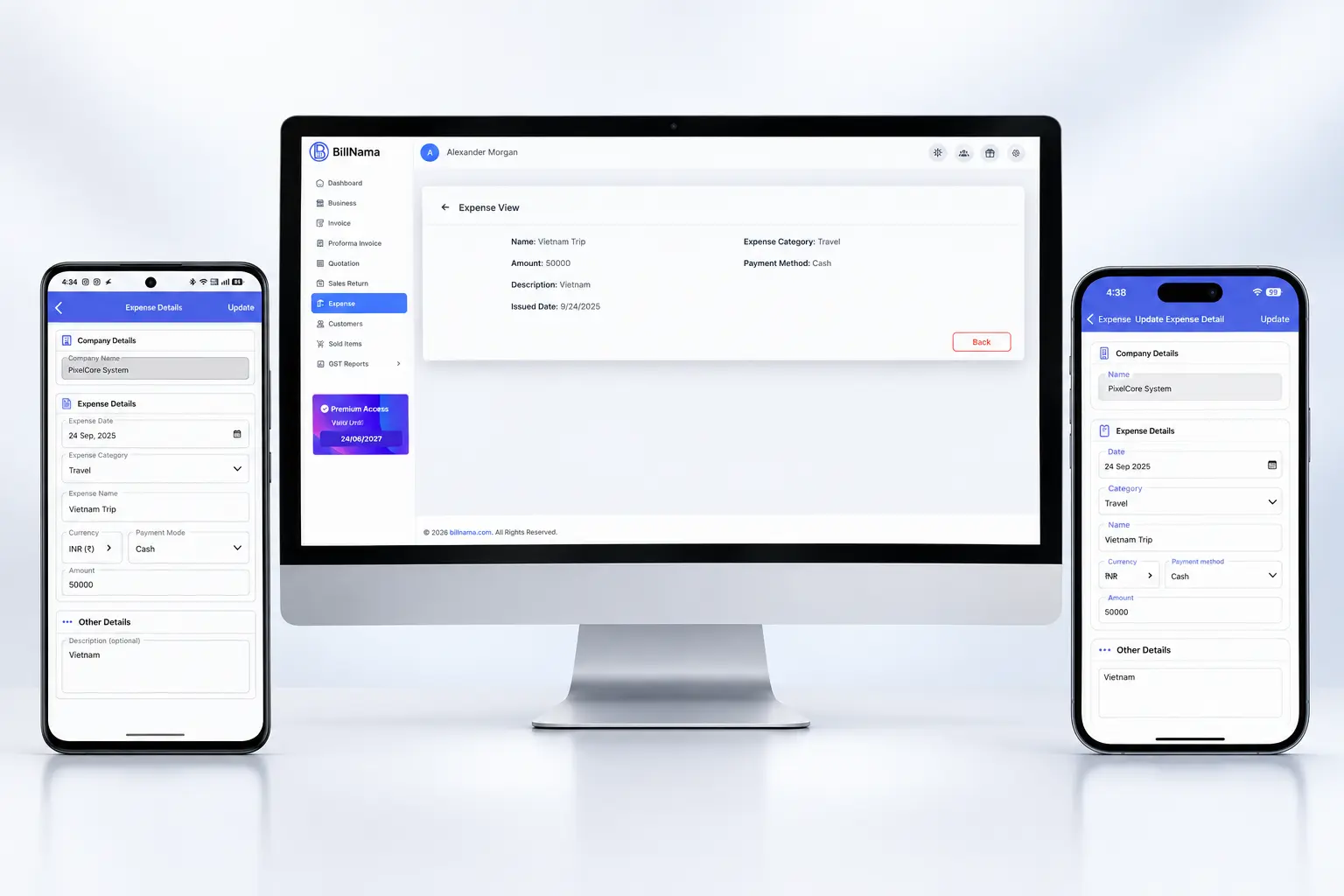
Expense tracking is the process of recording what a business spends on software, travel, supplies, and other costs so spending can be categorized, reviewed, and compared against income. BillNama logs each expense with an amount, category, and optional receipt, then syncs it with your invoices and reports for a real picture of profit, not just revenue.
Expenses vs. invoices vs. reports: an invoice records what you’re owed; an expense records what you’ve spent; a report combines both to show your actual profit. BillNama keeps all three connected so you’re not reconciling spreadsheets by hand.
Everything Expense Tracking Needs
Log a cost in seconds, keep the receipt, and see exactly how it affects your bottom line.
Quick Expense Entry
Log an amount, a category, and a note in seconds — right when the cost happens.
Expense Categories
Organize spending by type — software, travel, supplies, or your own custom categories.
Receipt Attachments
Snap a photo or attach a PDF receipt to any expense, so proof is never lost.
Synced With Invoices
See a cost right alongside the invoice or project it belongs to, not in a separate app.
Real-Time Totals
Running expense totals update the moment you log a cost, not just at month-end.
Multi-Currency Expenses
Log a cost in the currency you actually paid it in, even for international spending.
Tracking a Cost in 3 Steps
1
Log the Expense
Add the amount and a short note the moment you spend it, from your phone or desktop.
2
Categorize & Attach a Receipt
Sort it into a category and attach a photo or PDF receipt for your records.
3
See It in Your Reports
Watch it show up against your income automatically, no manual reconciling.
Built for Businesses That Want to Know Their Real Margin
Freelancers
Track software subscriptions and tools so you know what a project actually costs you.
Agencies
Log project costs per client and see true profitability, not just billed revenue.
Consultants
Capture travel and client-related costs the moment they happen, receipts included.
Small Retail & Service Businesses
Track supply and inventory costs against sales, without a separate spreadsheet.
More Than Expense Tracking — Run Your Whole Billing Cycle
Expenses connects directly to the rest of BillNama, so what you spend and what you earn live under the same customer and project records.
Invoicing & BillingBill for costs you’ve already tracked
Recurring InvoicesCompare recurring costs to recurring revenue
Quotations & EstimatesPrice a job using your real cost data
Proforma InvoicesConfirm an order before costs are committed
Customer LedgerSee every client’s balance alongside costs
Reports & EarningsSee real profit, not just revenue
Multi-Currency InvoicesMatch international costs to international bills
Invoice SignaturesGet sign-off before costs turn into a bill
Send Invoice on WhatsAppBill clients once costs are accounted for
US Sales Tax InvoicesTrack deductible costs alongside sales tax
VAT InvoiceTrack VAT-inclusive costs correctly
GST InvoicesTrack input costs alongside GST invoices
Recurring InvoicesCompare recurring costs to recurring revenue
Quotations & EstimatesPrice a job using your real cost data
Proforma InvoicesConfirm an order before costs are committed
Customer LedgerSee every client’s balance alongside costs
Reports & EarningsSee real profit, not just revenue
Multi-Currency InvoicesMatch international costs to international bills
Invoice SignaturesGet sign-off before costs turn into a bill
Send Invoice on WhatsAppBill clients once costs are accounted for
US Sales Tax InvoicesTrack deductible costs alongside sales tax
VAT InvoiceTrack VAT-inclusive costs correctly
GST InvoicesTrack input costs alongside GST invoices
Why Track Expenses With BillNama Over a Spreadsheet
- Costs and income live in one place, not two separate tools
- Receipts stay attached to the expense, not lost in an inbox
- Real-time totals, no waiting for month-end to know your numbers
- Unlimited expense tracking on the free forever plan
Frequently Asked Questions
What is expense tracking software?
Expense tracking software records what a business spends, sorted by category, so spending can be reviewed and compared against income. BillNama also attaches receipts and syncs expenses with invoices and reports.
How do I log an expense in BillNama?
Add the amount, pick or create a category, and optionally attach a receipt — the expense is logged immediately and reflected in your totals.
Can I attach a receipt to an expense?
Yes. Attach a photo or PDF receipt to any expense, so you always have proof on hand.
Can I categorize my expenses?
Yes. Sort expenses into categories like software, travel, or supplies, or create your own custom categories.
Do expenses affect my reports or profit calculations?
Yes. Every logged expense is reflected in your reports automatically, so you see real profit — income minus costs — not just revenue.
Can I track expenses in different currencies?
Yes. Log an expense in the currency you actually paid it in, useful for businesses with international costs.
Is expense tracking free on BillNama?
Yes. Expense tracking is unlimited on the free forever plan, with no credit card required — unlike invoices, quotations, and proforma invoices, which have their own monthly limits.
Can I link an expense to a specific client or project?
Yes. Attach an expense to the client or project it relates to, so you can see costs against that specific piece of work.
Can I edit or delete an expense after logging it?
Yes. You can update the amount, category, or receipt on any expense, or remove it entirely if it was logged by mistake.
Is there a mobile app for logging expenses on the go?
Yes. BillNama is available on iOS, Android, and web, fully synced, so you can log a cost the moment it happens.
Ready to See Where Your Money Actually Goes?
Join 40,000+ businesses using BillNama to track expenses and see their real profit — free forever.